Saturday, 3 May 2014

How to keep your search history 'private'

All of us use internet, even it is most important thing of our life. Internet make ease and simple our life. Everyone can connect to internet and get information of other corner of world but we should also take care and use some precaution while using it. So today post is to make you much secure on internet.

Your search history contains some of the most personal information you will ever reveal online: your health, mental state, interests, travel locations, fears and shopping habits.

And that is information most people would want to keep private. Unfortunately, your web searches are carefully tracked and saved in databases, where the information can be used for almost anything, including highly targeted advertising and price discrimination based on your data profile.

Fortunately, Google, Microsoft's Bing and smaller companies provide ways to delete a search history or avoid leaving one, even if hiding from those ads can be more difficult.

Google makes it easy to find your personal web history, manage it and even delete it. Just go to google. com/history and log in to your Google account. There, you will see your entire history and can browse it by category.

If you would like this history to go away, click the gear icon in the upper right of the page and choose Settings. Here, you can turn off search history, so Google won't save future searches. You can delete your history from Google's database or just remove specific items from your recent history.

You can turn off and erase your search history on Microsoft Bing at bing.com/profile/history. Yahoo lets you turn off future search histories but doesn't have a way to delete the old one. Visit search. yahoo.com/preferences/ to turn off your history.

How to keep your android malware free and secure

Android is the world most usable os this time in most of the smartphone. Even Phone, tablets, and much more are launching daily on bulk basis. We all of know sure think android first if we think of our andorid and most of us use this cause its ease and simplicity even a kid can operate it but also security must be first care of android. However nobody wants to send important data to hacker.
While it's true that Android is a little more susceptible to malware attacks than iOS, you can make your device impervious to even the most dastardly of digital assaults. Here's how.

Set a lock screen
Yes, Android lock screens seem to be about as secure as Sony's Playstation Network, but they do offer at least some security against casual attacks.

Install an anti-malware programme
Just like on a Windows machine, some kind of anti-virus software is handy. It's the second line of defence and there are a number of anti-malware apps available.

Don't cache passwords
It's annoying, but true. Caching passwords, while incredibly handy, is also a godsend to anyone who steals your phone. Of course, security measures like lock screens help, but the only foolproof method of protecting those passwords is not to save them. (Oh, and turn on two-factor authentication while you're at it.)

Check your SuperUser privileges
If you've made the choice to root your Android device, you'll need to be extra careful about security. A malicious app with root access would be dangerous - able to do basically anything to your phone, without your knowledge 

Ensure you only install apps from trusted sources
One of the most common methods of infection on Android is downloads of dodgy apps. Just double-check the software you install.

How to keep your android malware free and secure

Android is the world most usable os this time in most of the smartphone. Even Phone, tablets, and much more are launching daily on bulk basis. We all of know sure think android first if we think of our andorid and most of us use this cause its ease and simplicity even a kid can operate it but also security must be first care of android. However nobody wants to send important data to hacker.
While it's true that Android is a little more susceptible to malware attacks than iOS, you can make your device impervious to even the most dastardly of digital assaults. Here's how.

Set a lock screen
Yes, Android lock screens seem to be about as secure as Sony's Playstation Network, but they do offer at least some security against casual attacks.

Install an anti-malware programme
Just like on a Windows machine, some kind of anti-virus software is handy. It's the second line of defence and there are a number of anti-malware apps available.

Don't cache passwords
It's annoying, but true. Caching passwords, while incredibly handy, is also a godsend to anyone who steals your phone. Of course, security measures like lock screens help, but the only foolproof method of protecting those passwords is not to save them. (Oh, and turn on two-factor authentication while you're at it.)

Check your SuperUser privileges
If you've made the choice to root your Android device, you'll need to be extra careful about security. A malicious app with root access would be dangerous - able to do basically anything to your phone, without your knowledge 

Ensure you only install apps from trusted sources
One of the most common methods of infection on Android is downloads of dodgy apps. Just double-check the software you install.

How to stop videos ads on facebook autoload or playing automatically


We all of us know that a unnecessary video eats up our limited data bandwidth and facebook autoplaying ads are disapponting us. So today we found the solution for it and and data saving important trick.
 Facebook have  recently introduced the worst kind of ads to its users. If you sign in to the desktop or mobile version, a video trying to sell some kind of a service will immediately begin to play. The only way to stop it is to tap on it once.

Lifehacker's Whitson Gordon explains that you can completely disable the auto playing feature, but this hack only works on the desktop, not on your iPhone or Android device. iPhone and Androids can be set to play videos automatically only when connected to a Wi-Fi network.

Here's how it works for desktop:

* Sign in to your Facebook account. Scroll over to the right and click Settings at the top.

* Scroll over to the left and click "Videos" at the bottom.

* Move your cursor over to the right and click "Off." The videos won't automatically play on desktop anymore. This process was done on Google Chrome, and it works the same in Firefox. For some reason, however, the "Videos" option doesn't appear in Safari, so Safari users might be out of luck for now.


Here's how you do it on your mobile device (it's the same for both Android and iPhone):
* Go to Settings.

* Scroll down until you see the Facebook option. Tap on it.

* Go to "Settings" underneath the Facebook icon.

* Turn on "Auto-Play on Wi-Fi only." The videos will only play when you are hooked into a Wi-Fi network.

How to make your password more secure ; Facebook or emails or others


NEW YORK: If the Heartbleed security threat teaches us anything, it's that passwords don't offer total protection.
Browsers are supposed to keep passwords and other sensitive data safe, but a technical flaw in a widely used padlock security technology allows hackers to grab the information anyway. Even without this latest discovery, there have been countless disclosures of hackers breaking in to grab usernames and passwords, plus credit card numbers and more.
That's why many security experts recommend a second layer of authentication: typically in the form of a numeric code sent as a text message. If you're logging in to a website from your laptop, for example, you enter your password first. Then you type in the code you receive via text to verify that it's really you and not a hacker.
I've been using what's known as two-factor authentication or two-step verification on most of my accounts for more than a year, after seeing too many mysterious attempts to reset my Facebook password by someone who isn't me. The main exception was Gmail, but I enabled that recently after the discovery of Heartbleed. I was afraid the second authentication would be a pain to use, but things are going more smoothly than I expected after the initial setup.
The idea behind these double-layer passwords is to make it harder to use a password that's compromised or guessed. You're asked for a second piece of information that only you are supposed to know.
To balance security and convenience, you can typically bypass this check the next time you use the same Web browser or device. It won't help if someone steals your laptop, but it'll prevent others from using your password on their machines. If you're logging in at a library or other public computer, remember to reject the option to bypass that check next time.
The second piece of authentication could be your fingerprint or retina scan, though such biometric IDs are rarely used for consumer services. Financial services typically ask for a security question, such as the name of your childhood pet, the first time you use a particular Web browser or device. That's better than nothing, though answers can sometimes be guessed or looked up. Some banks offer verification codes by text messaging, too.
I like that approach and use it for a variety of email and social networking services. To me, email accounts are the most sensitive because email can be used to reset passwords elsewhere. That includes my banks and shopping sites.
The two-step requirement is fairly simple to turn on. With Google, for instance, it's under the Security tab in your account settings. On Facebook, look for Login Approvals under Security in the settings. With Apple IDs, visit appleid.apple.com rather than the account settings on iTunes.
After you enable it, you'll typically have to sign in to your account again on various Web browsers and devices. After entering your username and password, a code will get set to your phone. You'll have to enter that to finish signing in. This has occasionally meant getting off my couch to grab my phone from the charger, but that's a small price for security.
What if you're somewhere without cellular access and can't receive texts?
Most services have backup mechanisms. Google, Facebook and Microsoft have apps that will let you receive verification codes even when you're offline. Google and Facebook also let you generate 10 backup codes that you can download or print to keep in your wallet. Each can be used only once.
You can also turn off the two-step requirement temporarily if you'll be traveling without cellular access, though I don't recommend it. The reason I turned it on last year was because I was leaving the country and wouldn't be able to deal with further mysterious reset attempts.
Occasionally, you'll run into an app that won't accept the text code. Apple's Mail app on iPhones, iPads and Mac computers is one. Microsoft's Outlook software is another. If that happens, you'll have to go to your service's settings to generate a temporary password for that particular app. It's a pain, but I've rarely needed to do this.
There are several other challenges to making this work smoothly. For example, if you have a shared Twitter account, such as for your company or organization, two-step verification isn't very practical unless you also share your phone. There's a 12-character, hard-to-guess backup code you can use instead. But it's no security if you jot it down next to your main password.
The biggest problem, though, is losing your phone. Some services will let you provide a backup number, including a friend's cellphone or a landline phone. With Google, the code can be sent as a voice message instead of a text. Others offer a complex recovery code, which you'll have to jot down and keep in a safe place.
I know two-layer security is inconvenient. The first password is difficult enough to deal with. But think of the inconvenience involved should someone break into your account and shut you out. Consider the use of verification texts to be insurance.

Tuesday, 28 January 2014

MY NET SPEED

I FOUND IT IS INCREASED TODAY.!
SEE THE PIC OF TODAY SPEEDTEST.NET

Saturday, 4 January 2014

BEST DATA CARD AND PLANS IN INDIA

Nowadays everyone has a Laptop in India because the pricing of the laptops have come from high xxxxxRs to low xxxxxRs and now everyone is in need of a wireless internet connection to connect to the internet and always stay in touch. All the shopping malls and airports are now equipped with WiFi internet connections, but what is the option when there is no WiFi and you want to stay online while travelling?
Thats the time when you are looking for a wireless Datacard or USB option to get connected wireless all over India while travelling and let me introduce you with the Top3 available wireless data card connections -
  1. Reliance Netconnect – Reliance is currently the best wireless connection in India which can be used for bothReliance Data Card Netconnectlaptops and desktops and the monthly subscriptions start from just 400Rs/month and currently a promotional offer is running where in a free data card is offered. The download speeds are ranging from 15-25kbps when you opt in for unlimited data download package which is the best download speed offered in India on wireless internet connections.
  2. Tata Indicom Plug 2 Surf – Tata indicom broadband offers a internet compatible connection for laptops and PC’s where in you can surf internet anywhere in india with internet speeds upto 153 kbps though the practical speed is 20kbps only. The USB modem rental starts from 99Rs/month with time based and data based plans. You can get more information on this at ichoose.in
  3. Airtel Wireless – With Airtel’s Wireless Internet, you have the freedom to access the Internet anytime, anywhere across India. It enables Internet, Email, and Office applications with real-timesecure VPN access to corporate applications whilst on the move.Airtel Data Card is the superior PC Data Card solution which delivers wireless internet capabilities to laptops and notebooks, by providing EDGE and GPRS technologies in a single PC Card package.
Reliance USB NetconnectFrom the above 3 wireless USB/Data Card connections iam personally very much satisfied with Reliance Netconnect connections and i would recommend it to anyone who would be planning to buy one, but again always go for the external USB connection rather than the data card which is plugged into the internal slot in the laptops. Also review, rate and post your experiance on the best broadband connections in india.
BEST HIGH SPEED BROADBAND PLANS IN INDIA

In a web of Internet Service Providers (ISPs) in India, it seems like difficult for a common man who wishes to opt for an Internet Plan as many of the users are confused about the availability of the options. So to make things simpler, we have listed down all the Internet options available across major cities so that you can choose the plan which suits your pocket. Please note that the plans which we will be talking about are the Broadband plans and are wired plans which can be converted into Wi Fi. When we say High Speed Internet, its well above 10MBPS, you can now head over to the various options which can be found below,
Hyderabad:
While there are many high Speed Internet options available in Hyderabad, the best one in terms of Service availability and cost is “Beam Fiber” of which we have listed the tariff options below,
Beam Fiber:
Unlimited Data Plans (w.e.f. Nov 17, 2012)
PlanSpeedMonthlyHalf-YearlyYearly
B-Max 111015 Mbps1110.006110.0011100.00
B-Max 166020 Mbps1660.009130.0016600.00
B-Max 277025 Mbps2770.0015240.0027700.00

Bengaluru:
Users from Bengaluru too can now enjoy the magic of High Speed Internet with the help of Beam Fiber’s parent company which is named as ACT. We have tabulated below a detailed tariff chart which will help you get hold with the fastest internet.
ACT:
Plan Name
Speed
Price
FUP
Speed after FUP
ACT Privilege
15 Mbps
999
40 GB
512 Kbps
ACT Abundant
15 Mbps
1099
50 GB
512 Kbps
ACT Indulge
25 Mbps
1349
60 GB
512 Kbps
ACT Extravagant
25 Mbps
1999
100 GB
512 Kbps
ACT Force
25 Mbps
2749
200 GB
2 Mbps

Chennai:
Chennai users can too now benefit from High Speed Internet at an affordable price, all thanks to YOU Broadband services for coming out with an affordable tariff plans.
YOU Broadband:
Speed : 12MBPS
Validity1 Mth #3 Mth6 Mth12 Mth
Data UsageUnlimitedUnlimitedUnlimitedUnlimited
Speed (12 Mbps )Upto 25 GBUpto 80 GBUpto 175 GBUpto 375 GB
Plan Charges1212/-3639/-7280/-14560/-
After free data usage, you can still download @ 1 Mbps
# Installation Charges extra Rs. 770 for new connection

Mumbai:
YOU Telecom:
Speed : 12MBPS
Validity1 Mth #3 Mth6 Mth12 Mth
Data UsageUnlimitedUnlimitedUnlimitedUnlimited
Speed (12 Mbps )Upto 25 GBUpto 80 GBUpto 175 GBUpto 375 GB
Plan Charges1212/-3639/-7280/-14560/-
After free data usage, you can still download @ 1 Mbps
# Installation Charges extra Rs. 770 for new connection


Five Networks:
BROADBAND PLANS
Name & SPEED
Pack Value (Incl.Tax @ 12.36% & Local Maintenance Charges)
30 Day
Super Saver Pack
90 Day
180 Day
365 Day
DOWNLOAD Upto 10 Mbps / UPLOAD Upto 1Mbps
Name & SPEED

Rs.
Rs.
Rs.
Rs.
UT 10 Mbps
2000
N/A
11999
23999

As of now we have added only select ISPs but as in when we come across with affordable high speed plans in your city we will keep you posted with the same in this article. Just in case if you find any, then do let us know in the comments section below as we will add the same.

Launch of Apple iPhone 5s and 5C in India – November 1st 2013

The Apple iPhone 5s and 5c have already entered the US and UK markets a couple week back, and finally the all awaited launch of Apple iPhone 5S and iPhone 5C in India is scheduled on November 1st, just two days before the Eve of Diwali. The launch of the iPhone 5S will definitely will be on the probe, because of the features packed in, which would easily tempt any buyer who is planning to buy a smartphone that would be well worth it for the coming couple of years at least, and especially because of its 64GB version and it is 20% lighter, 18% thinner and has 12% less volume compared to its predecessor. Its design has been improved and is eye catching. The review of the iPhone 5S was generally positive in the US market where it is already available, considering it to be one of the the best smartphones available in the market because of its updated hardware. The iPhone range including the iPhone 5S and iPhone 5C, sold nine million units in their weekend of release breaking all the records for iPhone’s in US. Apple will be expecting similar kind of response from India and other countries on November 1st.
The iPhone 5s comes with the Apple-designed A7 64-bit chip with the M7 Motion Co-processor, and there’s a 8 megapixel iSight camera with True Tone flash, which has two flashes combining to form a perfect color combination, and on the front, there’s a Face Time camera for the video calling. The Touch ID fingerprint sensor system built directly into the home button is uses for the authentication and unlocking the phone. It can register with more than five fingers. The iPhone 5S was also the first Apple device to be launched with the newest version of the iOS mobile operating system, iOS 7. The iPhone has an 10 cm (4 inch) LCD (liquid crystal display), with the screen resolution of 640 x 1136 pixels at 326ppi pixel density. It has only five buttons. The 5S includes Siri, an intelligent personal assistant and knowledge navigator, it uses a natural language interface to answer questions and give suggestions. The iPhone 5s can capture slow motion videos, which means you’ll be seeing a lot of slo-motion videos on Facebook and YouTube. This feature is added as one more swipe to the left while shooting video. This slow motion video is recorded at 720 Pixel instead of 1080 pixel making it enough for sharing.
iPhone 5s comes with Applications such as Facebook, Calendar which can be synchronized with Facebook events, and many other applications can be downloaded and used, it has all other features as the preceding versions of iPhone. The iPhone 5C comes will all new design in multiple colors almost getting a look like the iPhone 5.
The unlocked 16GB iPhone 5S that sells around US$700 after the post taxes will be priced US$ 862 (Rs. 53,500) in India. Whereas the 32GB costs Rs. 62,500 and Rs. 71,500 for the 64GB model. The iPhone 5C will be available for Rs. 41,900 for the 16GB model and Rs. 53,500 for the 32GB model after all the post taxes.

Thursday, 2 January 2014

Google Adsense Custom Ad Sizes – The Good & Bad About this New Feature to Publishers

The Google Adsense team had contacted us a few weeks back and asked to remove the custom js ad units which we were running on our network of blogs. These were the ads which we were allowed to run on a few selected number of blogs depending on the traffic and the demographics. We have been running custom ad sizes on our blogs which generally were the single ad units but with different fonts and sizes and which would not totally look like a advertisement. All of the sudden someone from Google had contacted us with the following email :
Dear Publisher,
We are currently in the process of migrating publishers from Custom JavaScript formats to standard iframes. By moving publishers over, we are able to offer more features, innovating faster and more efficiently. As such your Custom JavaScript publisher features will be turned off on 6th December 2013.
We apologize for any inconvenience this may have caused.
For technical questions and troubleshooting, please send an email to our AdSense support team while logged into your Google account.
Best regards,
We were quite confused and when we got in touch with them, we were told that the results from the custom ad units were not par with the default ad units and hence Google is taking a decision to stop serving ads through this option. This was a kind of shock because we have had done a few tests and found that the custom ad units were generally giving us better results, but now are told that its actually bad for the publishers and hence we should switch back to the default ad units by Dec 6th.
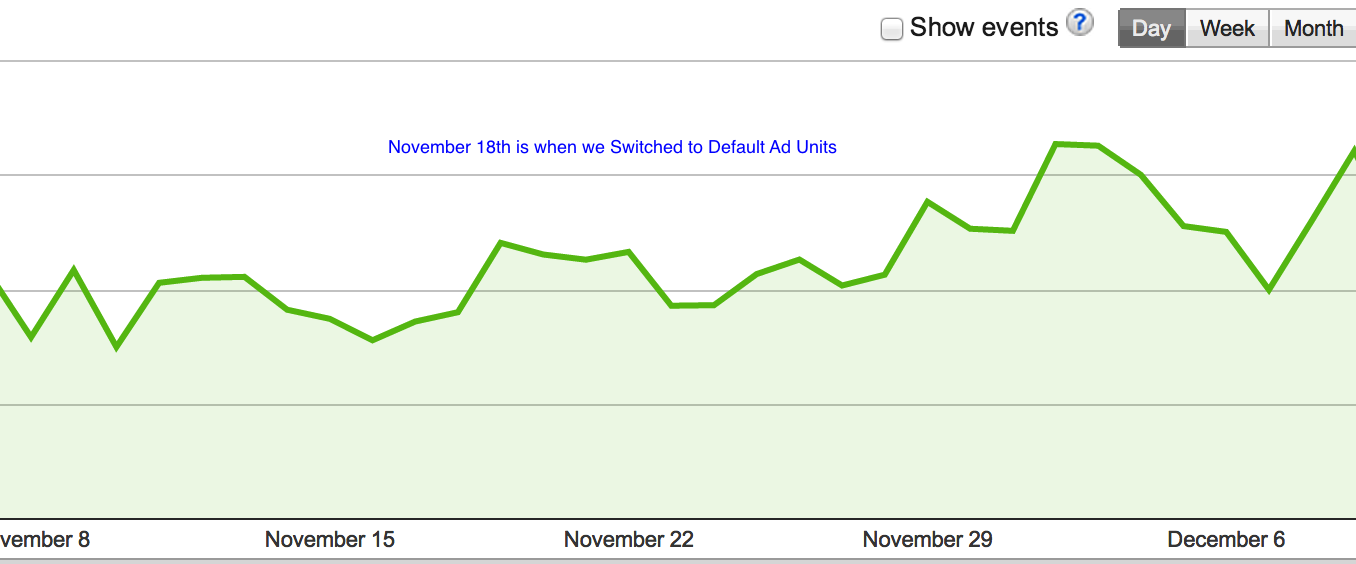
Google Adsense Custom Ad Unit StatsYou can clearly see that the revenue’s actually increased after the ad units were switched, this could either be a co-incidence or a truth which the Google representative had mentioned to us.
But this week it was again a surprise to know that the same custom ad units were now available to everyone, which means that anyone with a Adsense account can set the size of the ad units and place them on their web pages. Out of curiosity we are confused on why this major change all of the sudden when Google is very strict about its policies and why does it want people to make their web pages fill with ads in terms of content to ads ratio.
The Good About this : We feel that this new change would allow many publishers to set the ads based on their website design, and make them look better. In short giving them higher CTR because of better placement and some way chances that their revenues can increase too.
The Bad About this : Apart from the regular ad units, now you would find the web pages filled with larger ad units, considering that the new system allows to have one side of the ad unit to have a size larger than 300px, we could see people hosting ad units like 300×800 which is acceptable. A demo of this is partly available on Ezinearticles.com which has been hosting a large ad unit on the sidebar, but what would the look be if there is a similar horizontal ad above the content?
According the Google Adsense team you would get 434216 ad unit sizes which you can host on your websites but personally I feel that this is something they should have offered to a limited number of publishers based on their account authority in terms of how old the account is, the number of issues related to the account and the revenues.
If you plan to use these new ad units, then I would totally recommend you to do a A/B Split Test for a week on your websites by switching to custom units for the first week followed by default ad units the next week and then depending on the revenue reports and the Google analytics you should device whats best for you.
Let us know, how are the results of these new units performing for you.

Share

Twitter Delicious Facebook Digg Stumbleupon Favorites More